
Data Centre Services2026-09-26T10:04:47+05:30

ENTERPRISE INFRASTRUCTURE

Data Centre Services for Enterprises

Plan enterprise infrastructure around security, resilience and room to grow. CloudShots Technologies helps evaluate data-centre environments, integrate connectivity and coordinate deployment for business-critical workloads.

From facility assessment to migration and operational handover, align your infrastructure with application needs and an agreed delivery scope.


Enterprise data centre server room with rack infrastructure

What Are Data Centre Services?

Data centre services combine facility infrastructure and supporting services that enable businesses to house, connect and operate IT systems in professionally operated environments.

The scope may include rack or infrastructure space, power, cooling, physical security, connectivity and operational support. Equipment ownership and administration depend on whether the arrangement is private, colocated, hosted or managed.

Business continuity requires more than a facility choice: assess application dependencies, network paths, recovery plans and operational responsibilities together.

Where It Fits

A data centre can serve as an infrastructure location within a wider enterprise architecture.

  • Production and recovery workloads
  • Network and cloud interconnection
  • Consolidation, migration and expansion

The following section maps these roles in more detail.

Where Data Centre Services Fit

Select the role of the data-centre environment within your IT architecture before assessing a particular facility or service model.

Primary Production Infrastructure

Place core applications, databases and supporting systems in an environment selected for workload capacity, access, security and operational requirements.

Secondary / Disaster Recovery Environment

Plan a separate recovery environment with appropriate replication connectivity, recovery objectives and failure-domain separation.

Hybrid Cloud Architecture

Connect retained enterprise systems with cloud workloads through agreed routing, security controls and cloud access arrangements.

Infrastructure Consolidation

Bring distributed compute, storage and network infrastructure into fewer locations while keeping application dependencies and ownership clear.

Capacity Expansion

Evaluate additional rack space, power, cooling and connectivity when existing infrastructure approaches its practical limits.

Migration from Office / On-Premises Server Rooms

Assess alternatives to office server rooms when facility constraints, equipment growth or operational requirements justify a move.

High-Performance Connectivity to Cloud, Carriers and Partners

Position infrastructure near suitable interconnection options. Validate bandwidth, latency and service availability for each required path.

Types of Data Centres

These models describe different facility and operating arrangements; they are not interchangeable service commitments.

Enterprise / Private Data Centre

A facility dedicated to an organisation’s infrastructure, typically operated by the enterprise or under a dedicated operating arrangement. The enterprise carries responsibility for the agreed facility and technology scope.

Colocation Data Centre

A professionally operated facility where customers place their equipment in allocated rack or cabinet space. Power, cooling, access and connectivity services depend on the facility agreement.

Managed / Hosted Data Centre

An arrangement in which a service provider operates agreed infrastructure or management functions. Equipment ownership, administration and support boundaries vary by contract.

Hyperscale Data Centre

A large-scale facility designed to support extensive compute and storage platforms. Enterprises generally consume services from the platform operator rather than obtain unrestricted access to the facility.

Edge Data Centre

A smaller or distributed facility positioned closer to users, devices or workloads. Suitability depends on local capacity, application needs, connectivity and operational arrangements.

Cloud Data Centre

The physical infrastructure supporting cloud services. Customers generally manage subscribed cloud resources while the cloud operator controls the underlying facility and platform responsibilities.

The appropriate model depends on business requirements, workload, location, security, connectivity, resilience and commercial considerations. CloudShots assists with evaluation and coordination; facility and platform operation remains with the relevant enterprise or service provider.

Core Data Centre Capabilities

Build an agreed scope around facility, network and operational requirements. Availability and delivery responsibilities vary by location and selected arrangement.

Colocation Planning

Evaluate rack and cabinet requirements, equipment footprint, power and cooling considerations, access and expansion needs. See our Colocation services for the detailed rack-based scope.

Data Centre Migration & Relocation

Map assets, application dependencies, migration windows and rollback requirements. Coordinate equipment movement, installation and acceptance responsibilities.

Disaster Recovery Infrastructure

Plan secondary infrastructure around recovery objectives, replication capacity, geographic considerations and the testing needed to establish operational readiness.

Cross-Connect & Interconnection

Coordinate physical cross-connects and handoff requirements between customer equipment, carriers, cloud interconnection services and partners, subject to facility availability.

Connectivity Integration

Integrate internet access, private WAN and cloud connectivity with routing, security and resilience requirements. Review the complete path through the enterprise connectivity architecture.

Remote / Operational Support

Define available remote support, authorised physical tasks, monitoring responsibilities and escalation routes. Scope and response arrangements depend on the selected facility and providers.

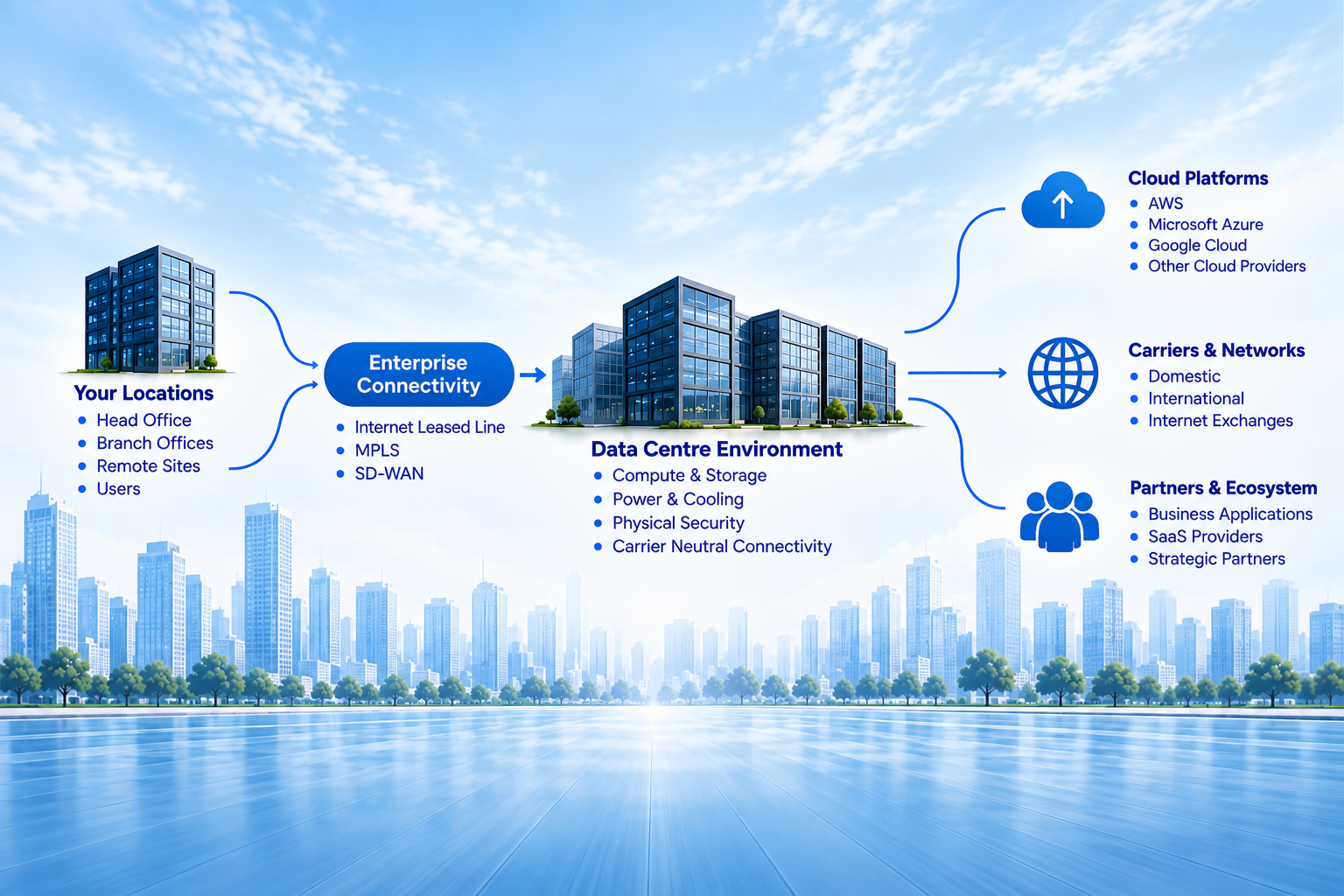
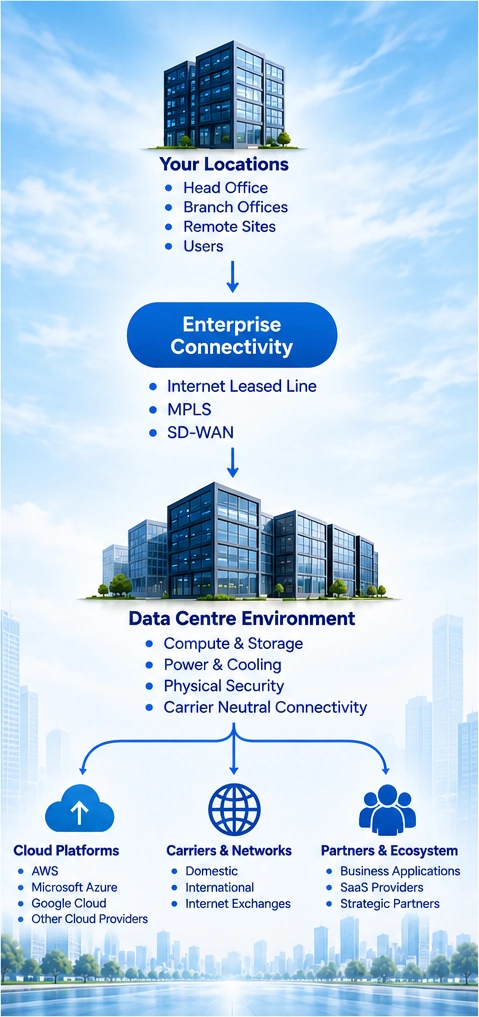
Enterprise Data Centre Architecture

Enterprise data centre architecture with connectivity, cloud and network integration

Connect Sites, Infrastructure and Services

Enterprise Sites → Enterprise Connectivity → Data Centre Environment → Carrier / Cloud / Partner Ecosystem

Connect customer locations using suitable Internet Leased Line, MPLS VPN or SD-WAN arrangements. Match bandwidth, interfaces and routing to the workloads and access requirements.

Within the data-centre environment, coordinate compute, storage, network equipment, power and cooling dependencies. Cross-connects and Cloud Connectivity can link eligible carriers, cloud services and partner networks.

Plan security layers, segmentation, monitoring and operational visibility across the complete path. Evaluate shared power and network failure risks: a second circuit does not itself prove path diversity, and dual power feeds do not guarantee application resilience.

Define customer, facility, carrier and cloud responsibilities explicitly. CloudShots supports planning and coordination across these boundaries.

Enterprise Data Centre Use Cases

Translate infrastructure choices into practical business outcomes, with acceptance criteria and operating responsibilities defined from the outset.

Primary Data Centre

Support core business platforms with a defined infrastructure environment and clear responsibilities for facilities, systems, connectivity and operations.

Disaster Recovery / Secondary Site

Prepare for disruption by placing recovery resources in a separately assessed environment and agreeing how recovery will be tested and activated.

Hybrid Infrastructure

Retain systems that need dedicated infrastructure while connecting them with cloud applications and services through a controlled architecture.

Infrastructure Consolidation

Reduce the complexity of managing dispersed equipment locations by planning a coordinated move, dependency mapping and a practical operating model.

Capacity Expansion

Accommodate growth in applications, users or data by assessing facility headroom and network capacity before committing to additional equipment.

Migration & Modernisation

Use a planned relocation to review ageing hardware, network design and operational processes, with staged cutovers and acceptance criteria that fit business priorities.

Deployment & Feasibility

Confirm facility, equipment, connectivity and operational dependencies before agreeing a deployment plan.
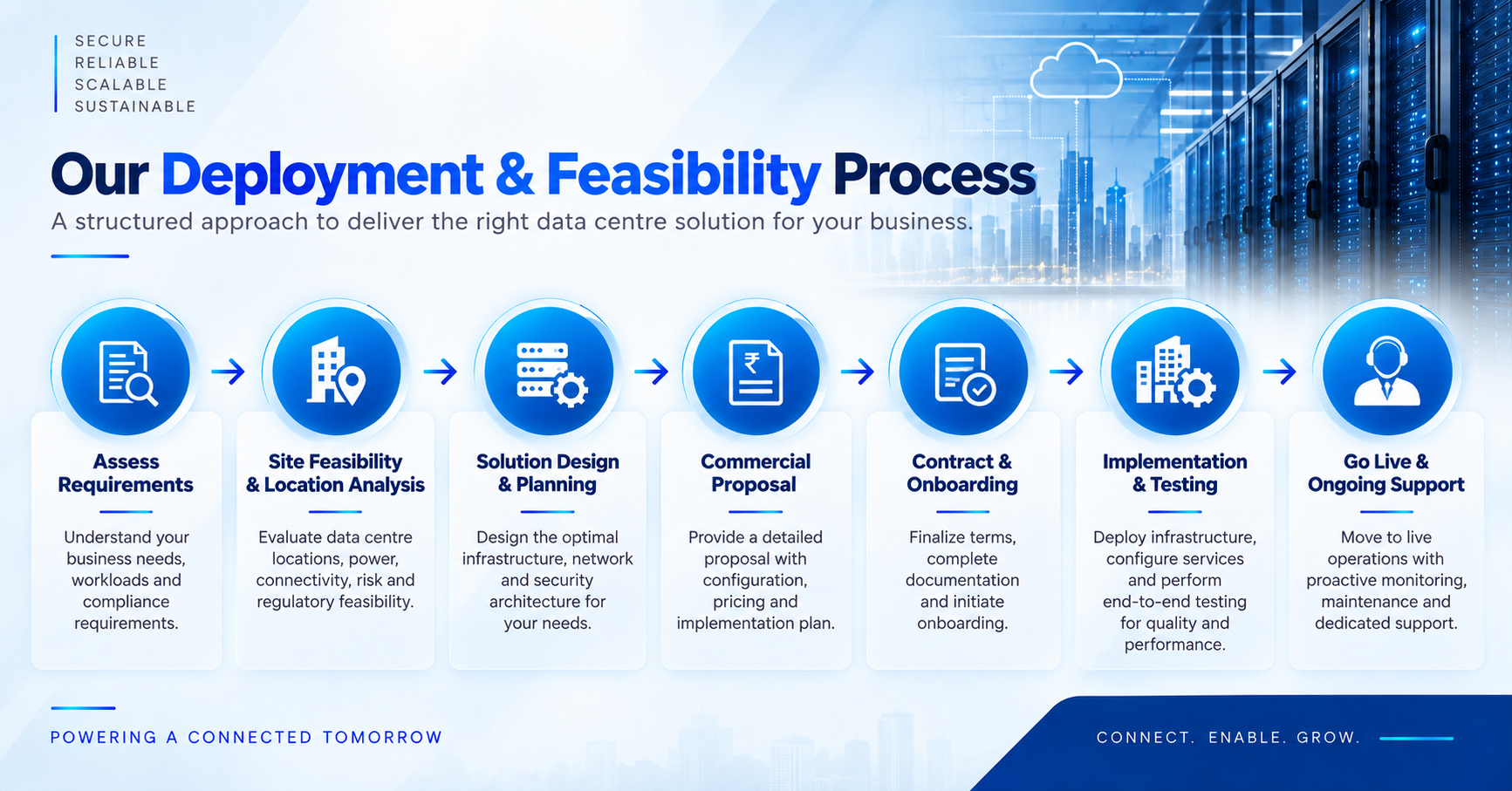
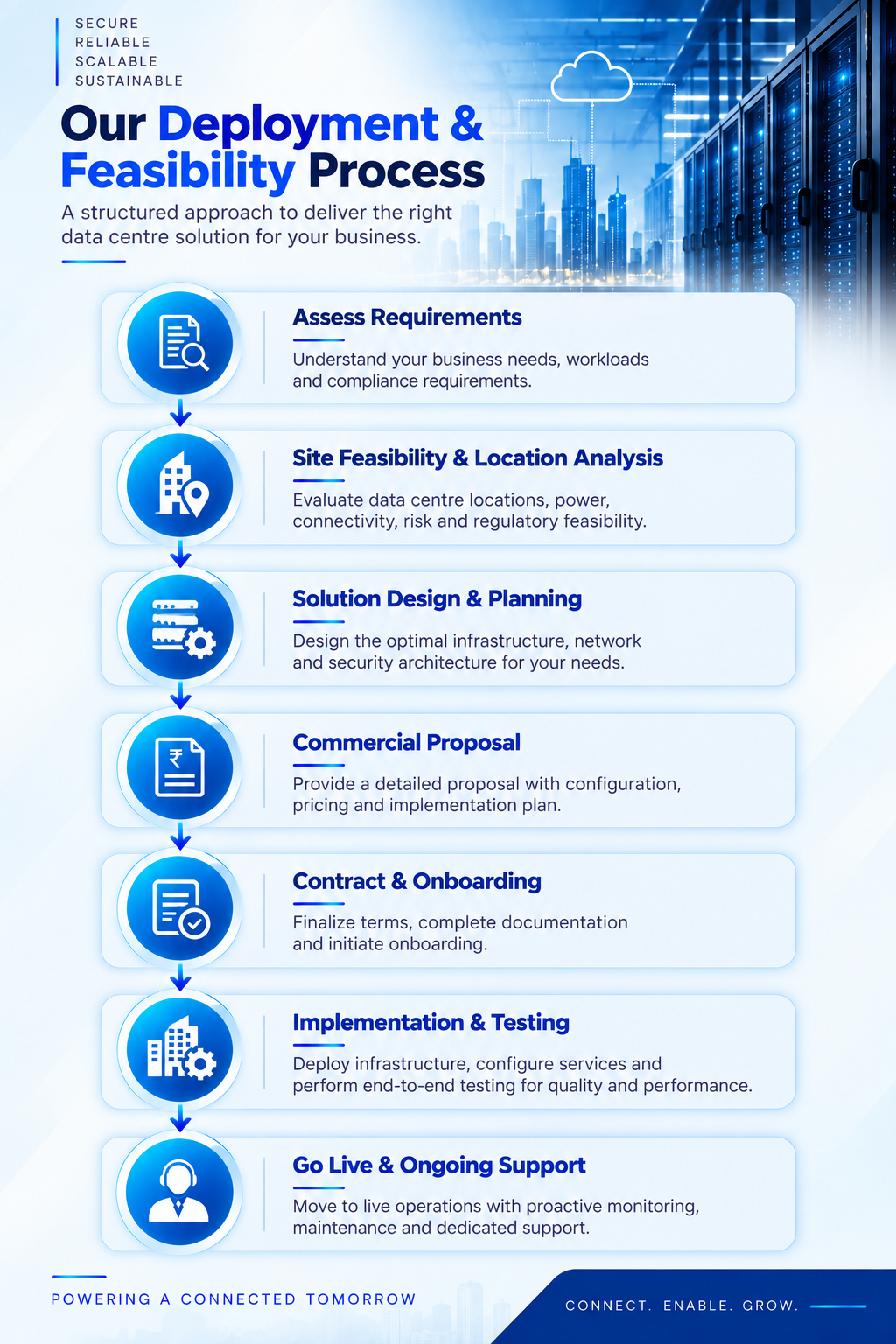
Data centre deployment and feasibility process

01

Requirements Discovery

Capture workloads, equipment inventory, rack footprint, power estimates, connectivity, resilience, access and operational requirements. Begin with City / Area / Location Name + Pincode.

02

Facility & Location Evaluation

Assess suitable locations, facility availability, geographic requirements, practical access and commercial considerations against the business requirement.

03

Rack, Power & Cooling Validation

Confirm rack allocation, equipment dimensions, power consumption, density, feeds, PDUs and cooling suitability. Validate growth assumptions and facility constraints.

04

Connectivity & Interconnection Design

Evaluate carrier access, cross-connects, internet/private paths, cloud interconnection, handoff interfaces, routing and the required diversity of failure domains.

05

Provisioning / Migration / Installation

Coordinate facility readiness, circuits, cross-connects, equipment logistics, installation windows and migration dependencies. Agree rollback plans and customer/provider responsibilities.

06

Testing & Operational Handover

Validate agreed power and network behaviour, application reachability, monitoring and remote access. Complete acceptance records, documentation, support contacts and escalation paths.

07

Go Live & Ongoing Support

Move to live operations with proactive monitoring, maintenance and dedicated support. Review service performance, operational incidents and changing capacity needs, and coordinate agreed infrastructure or connectivity changes as requirements evolve.

Deployment timelines depend on facility availability, equipment readiness, connectivity feasibility and customer requirements.

Initial location guidance: City / Area / Location Name + Pincode is sufficient for initial website enquiries. The full address can be collected during feasibility or order processing.

Why CloudShots Technologies

Connect infrastructure planning with the technical, commercial and operational work required for implementation.

Integrated Infrastructure Planning

Bring workload, equipment, facility, security and operational requirements together before selecting a deployment approach.

Connectivity & Data Centre Coordination

Keep carrier access, cross-connects, cloud connections and facility readiness aligned with the proposed infrastructure.

Multi-Location Deployment Support

Coordinate requirements and dependencies across enterprise sites and proposed data-centre locations, subject to local feasibility.

Technical & Commercial Assistance

Help organise technical inputs, scope boundaries and commercial comparisons so stakeholders can evaluate practical options.

Migration & Implementation Support

Assist with deployment planning, installation coordination, migration dependencies, testing and operational handover within the agreed scope.

Ongoing Infrastructure Expansion Support

Help review changing capacity and connectivity requirements and coordinate feasible additions with the relevant facility and service providers.

Data Centre Services FAQs

Common questions about infrastructure models, feasibility, migration and operations.

Can connectivity from multiple carriers be integrated?2026-09-18T18:36:55+05:30

Multiple carriers may be integrated where they are available at the selected facility and suitable cross-connects can be arranged. Confirm interfaces, capacity, routing, support boundaries and commercial scope. Different carrier names do not by themselves prove physical path diversity.

Can existing servers be migrated to a data centre?2026-09-18T18:37:36+05:30

Existing equipment may be migrated after compatibility, rack, power, cooling and connectivity checks. Plan application dependencies, backups, transport, cutover windows, rollback arrangements and acceptance testing before moving systems.

How does cloud connectivity fit with data centre infrastructure?2026-09-18T18:38:13+05:30

Cloud connectivity can link data-centre systems with eligible cloud services over suitable private, dedicated or internet-based paths. Availability depends on the facility, carrier or interconnection provider, cloud region and service. Routing, security and cloud-side configuration must be agreed separately.

What information is required for initial feasibility?2026-09-18T18:39:42+05:30

Provide City / Area / Location Name + Pincode, workload needs, an equipment inventory, rack footprint, approximate power, connectivity, resilience and support requirements, plus target timing. These inputs help organise an initial assessment.

Is complete installation address required during website enquiry?2026-09-18T18:40:50+05:30

No. City / Area / Location Name + Pincode is sufficient for the initial website enquiry. A full address and any necessary site details can be collected during feasibility or order processing.

How long does data centre deployment take?2026-09-18T18:41:44+05:30

Deployment timelines depend on facility availability, equipment readiness, connectivity feasibility and customer requirements. Migration windows, approvals and interconnection delivery can also affect the schedule. Agree a practical plan after feasibility rather than assuming a fixed deployment period.

Can capacity be expanded later?2026-09-18T18:42:19+05:30

Expansion may be possible subject to available rack space, power, cooling, network capacity and commercial arrangements. Review headroom and lead times before committing to additional equipment; adjacent space and matching services should not be assumed available.

What are data centre services?2026-09-18T18:31:49+05:30

Data centre services combine facility infrastructure and supporting services for housing, connecting and operating IT systems. The agreed scope may include rack space, power, cooling, physical security, connectivity and operational support. Responsibilities vary by facility and service model.

When should a business use a data centre?2026-09-18T18:33:27+05:30

Consider a data-centre environment when workload growth, facility limitations, recovery requirements, network interconnection or operating needs exceed what an existing server room can reasonably support. The decision should follow a requirements and feasibility assessment.

What is the difference between colocation and a private data centre?2026-09-18T18:35:10+05:30

Colocation places customer equipment in space within a facility operated by another organisation. A private data centre is dedicated to an enterprise’s infrastructure, with facility operation handled by the enterprise or under an agreed dedicated arrangement. Cost, control and operational responsibilities differ.

What is a disaster recovery data centre?2026-09-18T18:35:44+05:30

It is an environment used to support recovery of agreed systems after disruption. Its usefulness depends on recovery objectives, data replication, geographic and infrastructure separation, operating procedures and testing. A secondary facility alone does not establish a complete recovery capability.

How are power and cooling requirements evaluated?2026-09-18T18:36:23+05:30

Review equipment specifications, expected and peak consumption, rack density, feeds, PDUs and planned growth. Validate these against facility capacity and cooling constraints, including the redundancy design and the responsibilities of each party.

Plan Your Data Centre Requirement

Discuss your workloads, target location, equipment, power, connectivity and operational needs. CloudShots Technologies can help organise the requirements and coordinate a practical feasibility assessment.

For initial location details, share City / Area / Location Name + Pincode.

Go to Top